







A TRC20 wallet is a TRON blockchain wallet that stores, sends and receives TRC20 tokens, most commonly USDT (TRC20), the stablecoin with about $93 billion circulating on TRON as of 22 October 2026. The best TRC20 wallets in 2026 are TronLink, Trust Wallet, MetaMask, Bitget Wallet and Ledger, all free to create (Ledger charges for the device), and you can set one up in under five minutes. If you’re a startup or enterprise, “creating a TRC20 wallet” means building a wallet product of your own: a branded app, a browser extension, or a wallet embedded inside an exchange or payment platform.
This guide covers both. The first half answers what a TRC20 wallet is, compares the best TRC20 wallets in 2026, and shows how to set one up as a user. The second half is the complete TRC20 wallet development process (method, features, security and cost) from a team that does crypto wallet development on the TRON network for clients worldwide.
TRON has become the busiest settlement rail for stablecoins. USDT on TRON moves billions of dollars a day at fees that are a fraction of Ethereum’s, which is why remittance apps, payment gateways, exchanges and DeFi products increasingly need a TRC20 wallet at their core.
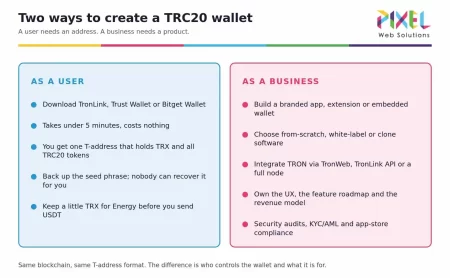
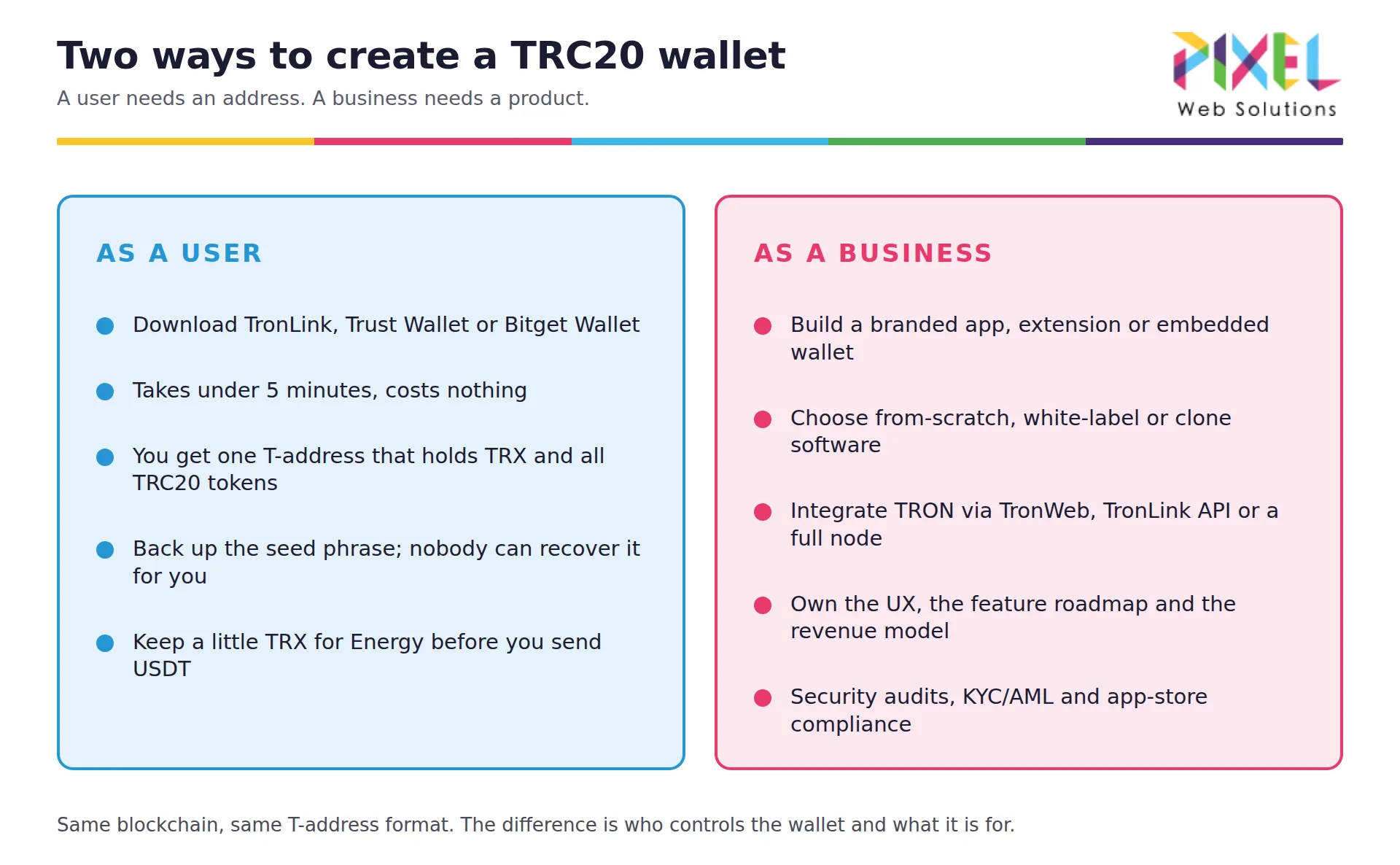
Two ways to create a TRC20 wallet: as a user (address in 5 minutes) vs as a business (branded wallet product)
Key Takeaways
- A TRC20 wallet is a TRON wallet. One 34-character address starting with T holds TRX, TRC10 tokens and every TRC20 token, including USDT. There is no separate “USDT wallet” to create.
- TRON carries more USDT than any other chain. About $92.9 billion of the $182.6 billion USDT supply sits on TRON as of 22 October 2026, ahead of Ethereum’s $72.6 billion, according to DefiLlama.
- The best TRC20 wallets in 2026 are TronLink (TRON-native, 10 million+ users), Trust Wallet and Bitget Wallet (multi-chain mobile), MetaMask (native TRON since 15 January 2026) and Ledger (hardware) for larger balances.
- Creating one takes 5 steps and 5 minutes: install from the official site, create the wallet, back up the seed phrase offline, add USDT (TRC20), and fund it with a little TRX for Energy.
- Keep TRX in the wallet. TRON gives each account 600 free Bandwidth but no free Energy, so a USDT transfer from a wallet with no staked TRX burns TRX at 100 sun per unit of Energy.
- Building a TRC20 wallet product costs from $5,000 for a single-platform wallet with Pixel Web Solutions, $25,000 to $50,000 for a white-label build across web and mobile, and $100,000 to $150,000 from scratch, over 8 to 24 weeks.
What Is a TRC20 Wallet?
A TRC20 wallet is a crypto wallet that holds a TRON account address and lets you store, send and receive TRC20 tokens, most commonly USDT (TRC20), on the TRON blockchain. Every TRC20 wallet address starts with the letter T and is 34 characters long.
- The same T-address holds TRX, TRC10 tokens and every TRC20 token; there is no separate “USDT-only” address type.
- Wallets come as browser extensions (TronLink, MetaMask), mobile apps (Trust Wallet, Bitget Wallet), desktop apps (Atomic, Exodus) and hardware devices (Ledger).
- For businesses, a TRC20 wallet can also be a custom-built product, such as a branded app or an embedded wallet inside an exchange or crypto payment gateway, which is what the development section of this guide covers.
Beyond storage, a TRC20 wallet (see the full list of crypto wallet features) generates and manages private keys, signs transactions, estimates TRX network fees, scans QR codes, and connects to TRON dApps and DeFi protocols such as JustLend and SUN.
TRON matters because of where USDT lives. As of 22 October 2026, DefiLlama’s stablecoin data shows about $92.9 billion USDT circulating on TRON, $72.6 billion on Ethereum, $9.2 billion on BNB Chain and $2.7 billion on Solana, out of roughly $182.6 billion in total. More than half of all USDT is TRC20 USDT, which is why almost every exchange, remittance app and OTC desk asks for a TRC20 wallet address.
What is TRC20?
TRC20 is the technical standard for fungible tokens on the TRON blockchain, TRON’s equivalent of Ethereum’s ERC20. Any token that implements the TRC20 interface (transfer, balanceOf, approve, allowance) can be held in any TRC20-compatible wallet.
- TRC20 tokens are smart contracts. USDT, USDD, BTT and WIN are all TRC20 tokens.
- Transfers are paid in TRX through TRON’s Energy and Bandwidth model, which is why USDT on TRON costs far less to move than USDT on Ethereum.
- The interface is specified in the TRON developer documentation, and any token contract can be checked on Tronscan.
- Businesses launching their own asset on TRON go through TRON (TRC20) token development first, then build or integrate the wallet that holds it.
Is a TRON wallet the same as a TRC20 wallet?
Yes, in practice. A TRON wallet holds a TRON account address; a TRC20 wallet is the same wallet described by the tokens it holds. Every TRON wallet can receive TRC20 tokens, and every “TRC20 wallet” is a TRON wallet.
- The “TRC20” label on an exchange withdrawal page refers to the network you’re sending over, not a different address type.
- TRX (the native coin), TRC10 tokens and TRC20 tokens all sit in one T-address.
- The only real difference between wallets is feature depth: some list USDT (TRC20) automatically, others require adding the token contract manually.
Best TRC20 Wallets in 2026 (Compared)
These are the wallets most TRC20 users hold USDT in today, and the benchmark any new wallet is measured against. All of the software wallets below are free and non-custodial, meaning you hold the keys; Ledger is a paid hardware device that signs transactions offline.
| Wallet | Type and platforms | Custody | Hardware pairing | TRON features | Stated reach |
|---|---|---|---|---|---|
| TronLink | Browser extension, iOS, Android | Self-custody, free | Ledger import over Bluetooth | TRX staking, multisignature, Web3 browser for TRON dApps | 10,000,000+ users |
| Trust Wallet | iOS, Android, browser extension | Self-custody, free | Not stated on its TRON page | TRX staking, in-app buy and swap | 2.7 million app store reviews |
| MetaMask | Browser extension, iOS, Android | Self-custody, free | Not stated for TRON | Native TRON accounts since 15 January 2026; TRX staking on mobile only | Not stated |
| Bitget Wallet | iOS, Android, Chrome | Self-custody, free | Not stated on site | Swap across 130+ blockchains, stablecoin yield | 100,000,000 users |
| Ledger (Nano S Plus, Nano X) | Hardware device plus Ledger Wallet app | Cold storage, paid device | It is the hardware wallet | TRC10 and TRC20 support, TRX staking through the app | Not stated |
| Exodus | Desktop, iOS, Android | Self-custody, free | Ledger via Exodus Mobile; Trezor not supported for TRON | TRC20 tokens by contract address; TRC10 not supported | Not stated |
| Atomic Wallet | Windows, macOS, Linux, Android (iOS app unavailable as of October 2026) | Self-custody, free | None | TRX staking, built-in swap | Not stated |
Sources: each wallet’s own website, checked 23 October 2026: TronLink, Trust Wallet’s TRON page, MetaMask’s TRON launch post, Bitget Wallet, Ledger’s TRC20 page, Exodus’s TRON FAQ and Atomic Wallet’s TRON page. “Not stated” means the vendor’s page does not publish that detail.
TronLink
The TRON-native wallet, available as a browser extension and mobile app, with more than 10 million users according to its own site. Native support for TRC20 tokens, dApps, DeFi, multisignature accounts, Ledger import and staking TRX for Energy. The default recommendation for anyone new to TRON, and the wallet most TRON dApps are tested against.
Trust Wallet
A multi-chain mobile wallet with simple USDT (TRC20) support alongside ERC20 and BEP20 tokens, plus a browser extension. Strong for users who hold assets across several chains, with TRX staking and in-app purchases built in.
MetaMask
The largest Ethereum wallet added native TRON accounts on 15 January 2026, so an EVM-first user can now hold TRX and TRC20 USDT in the same multichain account. Staking TRX for Energy works on mobile only, so extension users without staked resources burn TRX on each transfer.
Bitget Wallet
A multi-chain wallet with built-in swap and dApp access across 130+ blockchains, popular with users who also trade on the Bitget exchange. Supports TRC20 USDT natively and reports 100 million users on its site.
Ledger
The hardware option. The Tron app on a Nano S Plus or Nano X signs every TRC20 transaction on the device, and the Ledger Wallet app manages TRC10 and TRC20 tokens and TRX staking. Choose it for balances you would not want sitting on a phone.
Atomic Wallet
Desktop and Android, multi-currency, non-custodial, with built-in exchange and TRX staking. Full control of private keys. Its iOS app was listed as temporarily unavailable on the App Store when we checked in October 2026.
Exodus Wallet
Known for its interface and portfolio view; TRC20 USDT support with in-app swaps and desktop-mobile sync. Ledger pairing works through Exodus Mobile, but Trezor does not support TRON in Exodus.
Cobo Wallet
Enterprise-grade with both custodial and non-custodial options, multi-user approval and institutional security. It is the reference point for business and asset-manager wallets.
Any of these can be the model for your own product; see how to create a crypto wallet like Trust Wallet for a worked example. The fastest path is a white-label crypto wallet with these standard features already built, customized to your brand.
How to Create a TRC20 Wallet as a User (Under 5 Minutes)
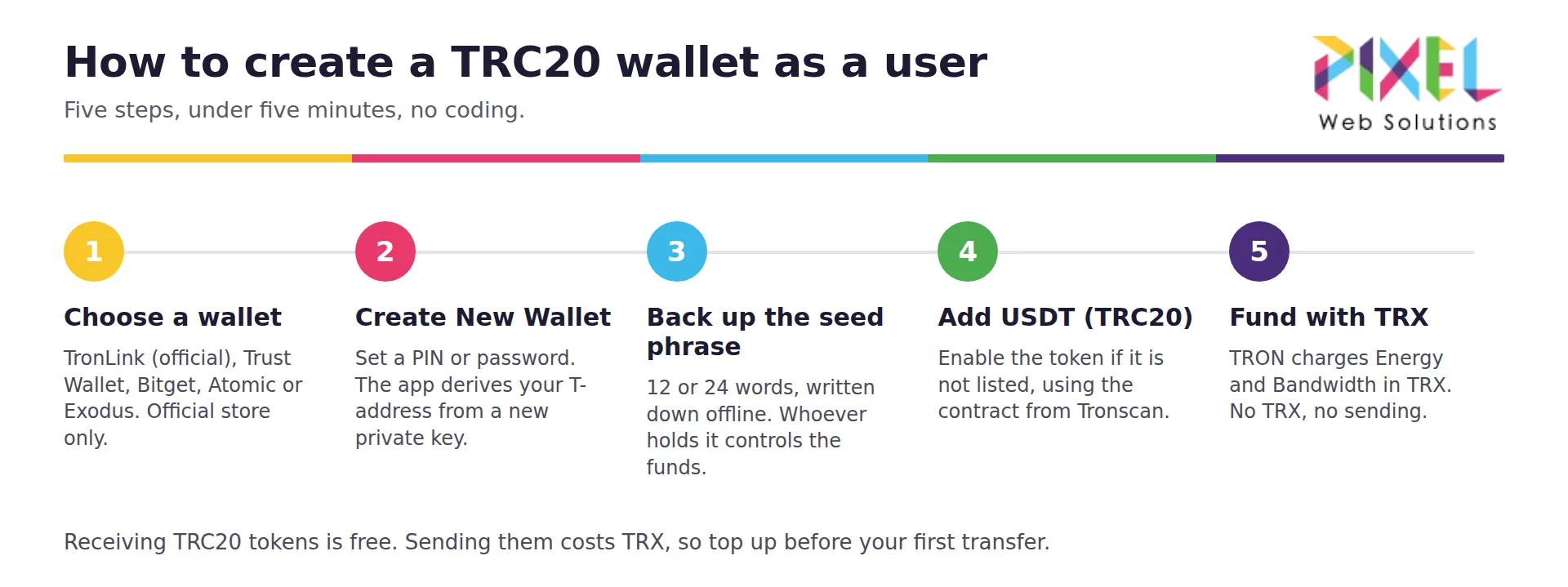
How to create a TRC20 wallet as a user in 5 steps: choose wallet, create, back up seed phrase, add USDT TRC20, fund with TRX
If you just need a wallet to hold USDT (TRC20), download a TRON-compatible wallet, create a new wallet, back up the seed phrase, and copy the T-address it generates. No coding is involved and the wallet itself is free.
-
Choose a wallet. TronLink is the TRON-native wallet; Trust Wallet, MetaMask, Bitget Wallet, Atomic and Exodus all support TRC20. Install only from the official website or app store and check the developer name, because fake wallet apps are the most common way TRC20 funds are stolen.
-
Create New Wallet. Set a password or PIN. The app generates your private key and derives a 34-character address starting with T.
-
Back up the 12- or 24-word seed phrase offline. Anyone holding the phrase controls the funds, and no wallet provider can recover it for you.
-
Add USDT (TRC20) if it isn’t listed by default, by searching the token or pasting the contract address from Tronscan.
-
Fund the wallet with a little TRX. TRON charges Energy and Bandwidth in TRX, so a wallet holding USDT but zero TRX cannot send until it holds TRX or has TRX staked for Energy. The network’s own chain parameters price Energy at 100 sun (0.0001 TRX) per unit and give each account 600 free Bandwidth, so a typical USDT transfer that needs about 65,000 Energy burns roughly 6.5 TRX when nothing is staked, and about double that when the recipient has never held USDT.
What does a TRC20 wallet address look like?
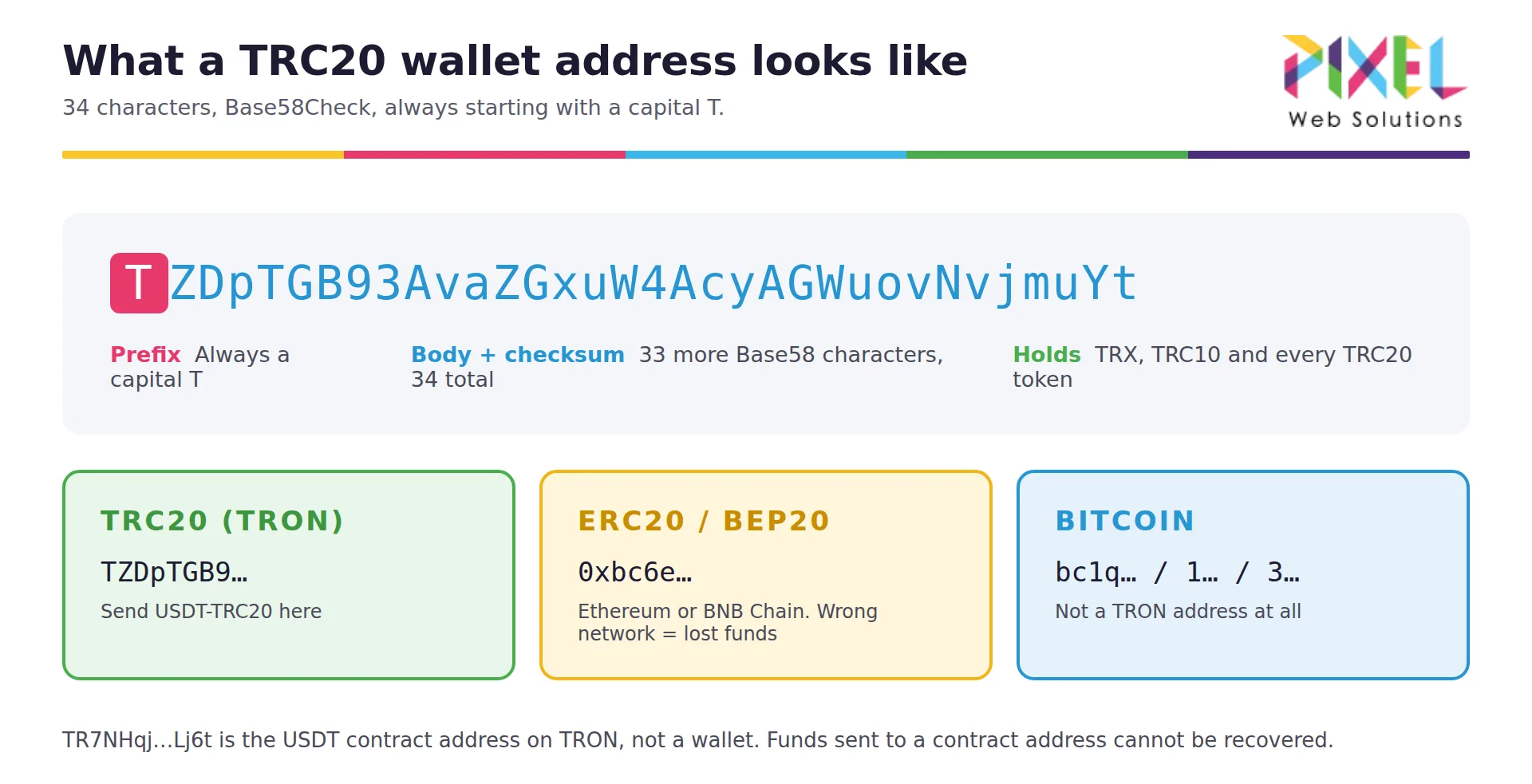
TRC20 wallet address format: 34 characters starting with T, compared with ERC20 0x and Bitcoin bc1 addresses
A TRC20 wallet address is a 34-character Base58Check string that always starts with a capital T, for example TZDpTGB93AvaZGxuW4AcyAGWuovNvjmuYt. An ERC20 or BEP20 address starts with 0x; a Bitcoin address starts with 1, 3 or bc1.
-
The address is derived from your public key. Sharing the address is safe; sharing the private key or seed phrase is not.
-
TR7NHqjeKQxGTCi8q8ZY4pL8otSzgjLj6t is the USDT contract address on TRON, not a wallet address. Many guides show it as an “example wallet address”, but funds sent to a contract address are unrecoverable.
-
TRON also represents the same address internally in hex, starting with 41. Wallets and exchanges only ever show the T form.
-
Paste any T-address into Tronscan to see its TRX balance, TRC20 holdings and full transaction history.
Why Should You Invest in TRC20 Wallet Development?
For a startup or enterprise entering crypto, or scaling an existing blockchain product, a custom TRC20 wallet gives you full control of the user experience, the feature set and the revenue model, rather than sending users to a third-party app. The main reasons businesses build their own:
1. Low cost and high speed
TRON confirms blocks in about three seconds and TRC20 transfers cost a fraction of the equivalent ERC20 transfer. That makes a TRC20 wallet viable for micropayments, cross-border remittances and in-app dApp payments where Ethereum fees would kill the use case.
2. Full control and brand customization
Your own wallet means your UI, your onboarding, your feature roadmap and your brand, not a white-labelled third-party experience you can’t change.
3. Increasing demand for USDT on TRON
USDT (TRC20) is the most-used version of Tether, a fiat-backed stablecoin, for transfers because of its low fees, and TRON holds more USDT than any other chain. A wallet that handles USDT-TRC20 well serves the largest stablecoin audience there is.
4. Supports multiple business models
A TRC20 wallet can be the core of a DeFi app, a payment gateway, a cryptocurrency exchange, an NFT marketplace or a remittance product, and it can be monetized through swap fees, staking, premium features or embedded services.
5. Scalable and future-ready
Built on the right architecture, a TRC20 wallet extends into multi-chain support, cross-chain bridges, staking, hardware-wallet integration and Web3 features without a rebuild.
Step-by-Step Process to Create a TRC20 Wallet as a Business
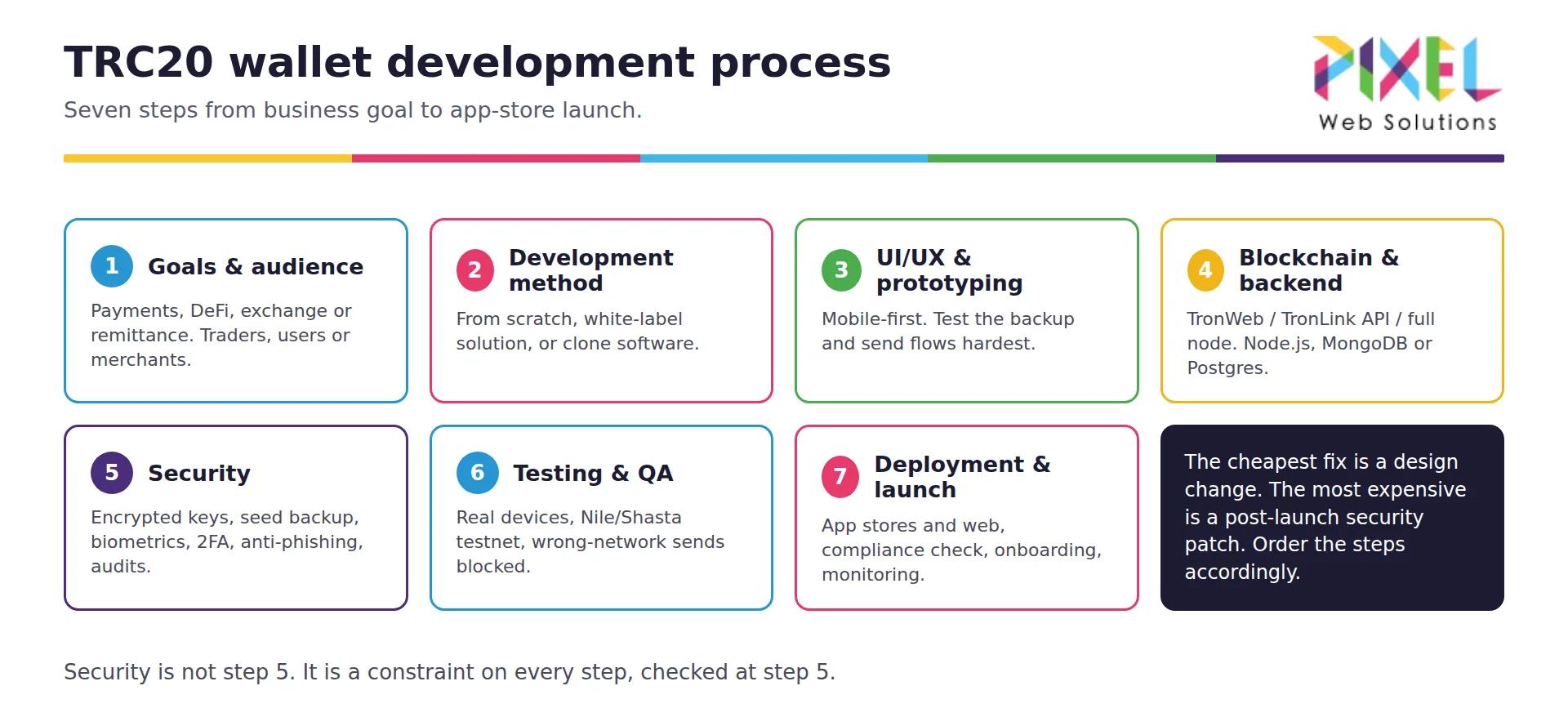
TRC20 wallet development process in 7 steps from business goals to app-store launch
Building a TRC20 wallet product is more than writing code. It is shipping a secure, scalable application that matches your business intent and your users’ expectations. These are the seven steps we follow.
1. Define your business goals and audience
Decide what the wallet is for: USDT payments, DeFi access, exchange deposits and withdrawals, or a remittance corridor. Then fix the audience: traders, everyday users, merchants or institutions. These two decisions drive the feature set, the custody model and the UI/UX tone from day one.
2. Choose your development method
There are three ways to build a TRC20 wallet:
-
From scratch: full control over design, features and security; highest time, budget and expertise requirement.
-
White-label crypto wallet solution: a pre-built, customizable framework for faster, lower-cost market entry.
-
Crypto wallet clone software: replicates the core features of established wallets for rapid launch, such as a Trust Wallet clone script with TRON support enabled.
If you’re weighing the general route rather than TRON specifically, our step-by-step guide to creating a cryptocurrency wallet app compares the three methods in depth.
3. UI/UX design and prototyping
Design is what makes a wallet trusted or abandoned. Take a mobile-first approach, prototype in Figma or Adobe XD, and run user testing on the critical flows: creating a wallet, backing up the seed phrase, sending USDT, and recovering from an error. Users who fumble a backup step lose funds, and blame the app.
4. Blockchain and backend integration
Integrate with TRON using TronWeb, the TronLink API, or your own TRON full node. The wallet must generate TRON addresses, interact with TRC20 smart contracts, send and receive tokens, and estimate Energy and Bandwidth costs in TRX. The backend (Node.js with MongoDB or PostgreSQL is typical) manages sessions, address indexing, balance caching and transaction history securely and at scale. This is the stage where a custom blockchain development company with TRON integration experience saves the most time.
5. Implement security features
Security is the product. Non-negotiables for a TRC20 wallet:
-
Encrypted private-key storage on device (never on your servers for non-custodial wallets)
-
Seed-phrase backup and recovery flow
-
PIN, biometric (fingerprint/Face ID) and two-factor authentication
-
Phishing and clipboard-hijack protection on the send screen
-
Regular code audits and smart contract audit services before launch and after every major release
6. Testing and quality assurance
Test on real devices across iOS and Android, with real TRC20 tokens on TRON’s Nile or Shasta testnet. Cover unit, integration and user-acceptance testing, and specifically test: sending to an ERC20 address (must be blocked), sending with zero TRX (must fail gracefully), QR scanning, and every TRC20 token you intend to support.
7. Deployment and launch
Publish to the Google Play Store, the Apple App Store and/or the web, after checking regional compliance requirements. Ship onboarding tutorials and live support from day one, monitor performance and transaction failure rates post-launch, and plan updates from user feedback and TRON network changes.
Unique Features and Functionalities of a TRC20 Wallet
The features that separate a wallet users keep from one they uninstall:
-
Multi-token support: store, send and receive every TRC20 token (USDT, USDD, BTT, WIN and any custom TRC20 token you create), not just one.
-
Private-key management and seed-phrase backup: non-custodial control with a recovery flow users can actually complete; enterprise wallets add multi-signature or MPC key management.
-
QR code scanning: send to scanned addresses rather than mistyped ones.
-
Real-time transaction notifications: sent, received, confirmed and failed.
-
Live balances and prices: portfolio value in fiat, updated in real time.
-
Biometric authentication: fingerprint and Face ID login on supported devices.
-
In-app token swap: swap TRC20 tokens through integrated DEX APIs; the same rails that power crypto trading bot development.
-
dApp browser: interact with TRON dApps and DeFi protocols without leaving the wallet.
-
Staking and governance: stake TRX for Energy and rewards, and vote on Super Representatives.
-
Cross-chain compatibility: bridge to Ethereum, BNB Chain and others so users manage multiple token standards in one place.
-
Hardware wallet support: Ledger and Trezor integration for cold storage of TRC20 assets.
-
Transaction management: searchable, filterable history with status and fee detail.
USDT TRC20 Wallet Development: Launch Your Next-Gen Wallet
USDT on TRON is the most transferred stablecoin in the world because a transfer costs cents instead of dollars and settles in seconds. For fintechs, payment platforms and remittance businesses, a USDT TRC20 wallet is the product that turns that rail into a customer-facing service.
A USDT TRC20 wallet you build can be a standalone app, or a wallet embedded inside an exchange, a merchant payment gateway that settles in USDT or a DeFi wallet. For the infrastructure side, see the cost to build stablecoin payments infrastructure. Core scope is USDT transfers, balance tracking, transaction history and secure key storage; add-ons include biometric login, QR scanning, fiat on/off-ramps and multi-device sync.
How to Create a USDT TRC20 Wallet
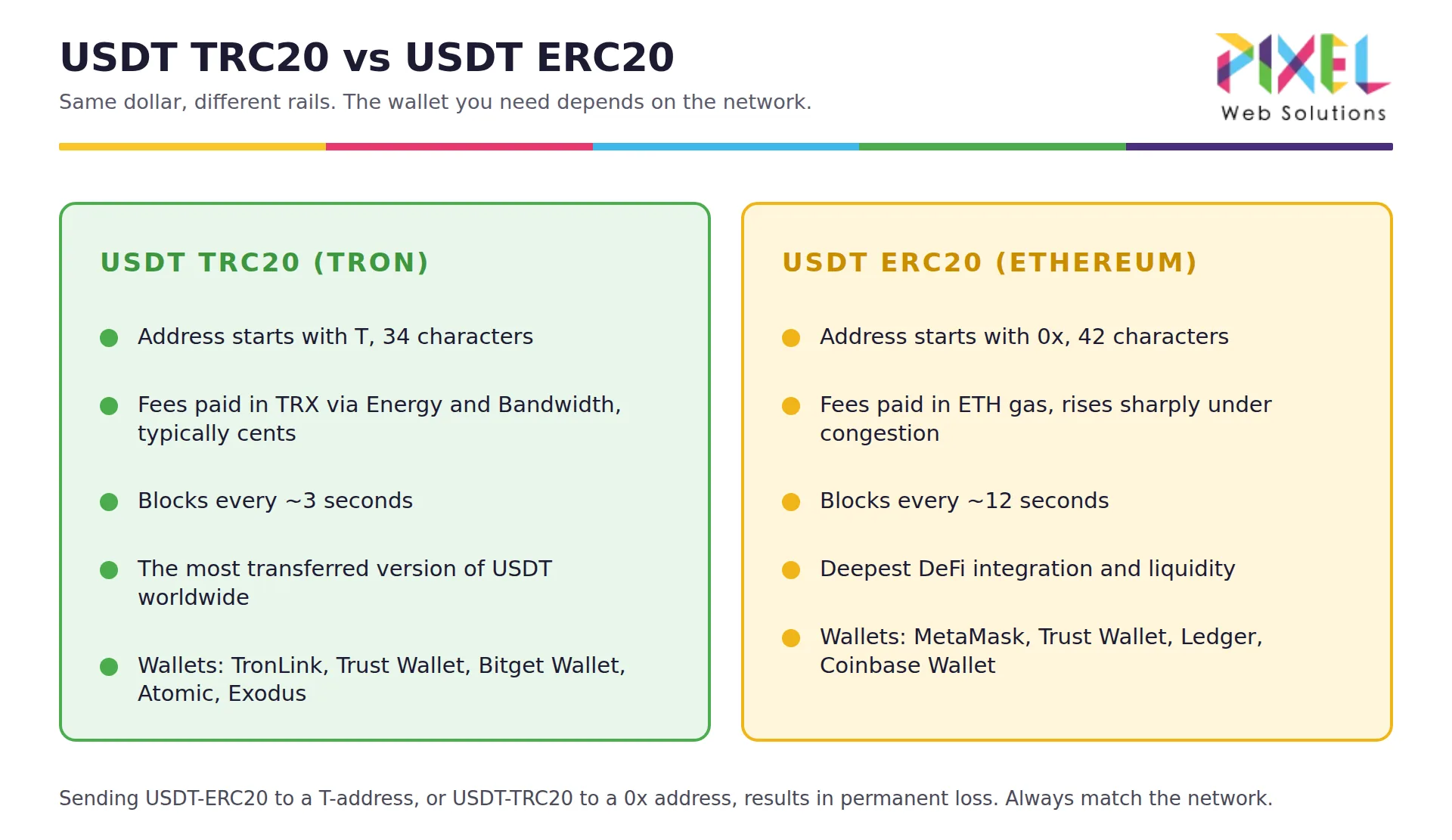
USDT TRC20 vs USDT ERC20: address prefix, fees, block time and compatible wallets
A USDT TRC20 wallet is any TRON wallet with the USDT (TRC20) token enabled. Create a TRON wallet, then select USDT on the TRON network when receiving. There is no separate “USDT wallet” to create.
-
When withdrawing from an exchange, choose network TRC20 (TRON). Sending USDT-ERC20 or USDT-BEP20 to a T-address results in permanent loss.
-
Receiving USDT costs nothing; sending it burns TRX for Energy unless TRX is staked, so keep a small TRX balance in the wallet.
-
USDT on TRON is issued by Tether; the current contract and circulating supply are published on Tether’s transparency page.
-
For a business product, the same USDT-TRC20 flow is built into a payment gateway or an exchange with TRON deposits and withdrawals.
How Much Does It Cost to Create a TRC20 Wallet?
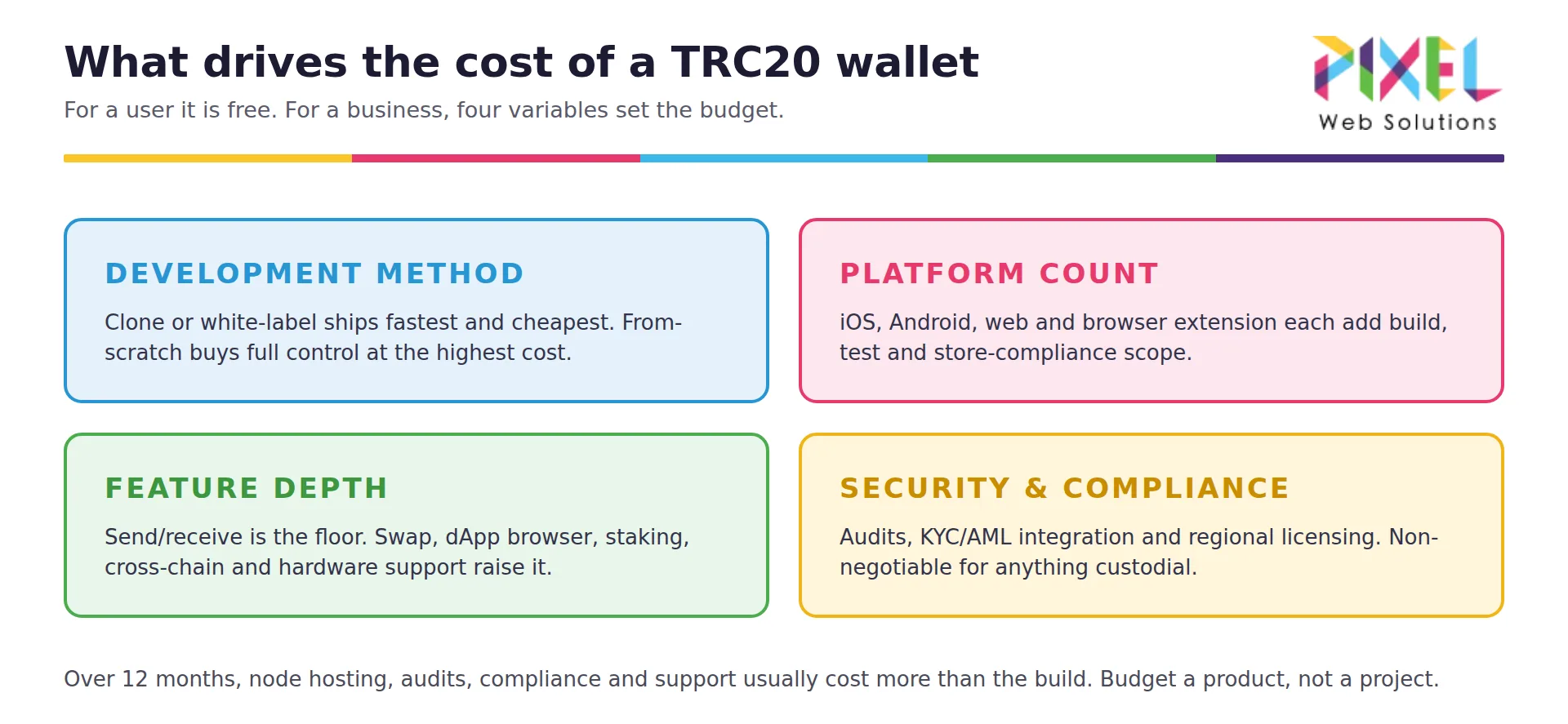
Four cost drivers of TRC20 wallet development: method, platform count, feature depth, security and compliance
Creating a TRC20 wallet as a user is free, because every wallet app generates a TRON address at no cost, and only sending tokens costs TRX. Building a TRC20 wallet product starts at $5,000 with Pixel Web Solutions for a single-platform non-custodial wallet with core features (white-label from about $4,500), and typically runs $25,000 to $50,000 for a white-label or clone build across web and mobile, $50,000 to $100,000 with advanced features, and $100,000 to $150,000 for a from-scratch, enterprise-grade wallet, over roughly 8 to 24 weeks. The cost is driven by four things:
-
Development method: from-scratch, white-label or clone.
-
Platform count: iOS, Android, web and browser extension each add scope.
-
Feature depth: a basic send/receive wallet vs. in-app swap, dApp browser, staking, cross-chain and hardware-wallet support.
-
Security and compliance scope: audits, KYC/AML integration, and regional licensing.
Ongoing costs (TRON node hosting or API subscriptions, security audits, app-store compliance and customer support) usually outweigh the build price over a 12-month horizon, so budget the wallet as a product, not a one-off. The full line-item breakdown by feature and platform is in our crypto wallet app development cost breakdown for 2026.
Conclusion
A TRC20 wallet is a TRON wallet for TRC20 tokens, and USDT (TRC20) is the reason most people want one. As a user, you can create one free in five minutes with TronLink, Trust Wallet, MetaMask or Bitget Wallet, or pair any of them with a Ledger for cold storage. As a business, creating a TRC20 wallet means building a product on the cheapest, fastest stablecoin rail in the market, for payments, remittances, DeFi or an exchange.
Pixel Web Solutions is a crypto wallet development company that builds TRON wallets, with hands-on experience in TRON integration, wallet architecture and secure, scalable delivery. From consultation to launch, we build TRC20 wallets that lead on performance, usability and security.
Frequently Asked Questions
Which TRC20 wallet is best in 2026?
TronLink is the best TRC20 wallet for TRON-only users because it is built for the network, supports staking, multisignature and Ledger pairing, and reports more than 10 million users. Trust Wallet, Bitget Wallet and MetaMask are better if you also hold Ethereum, BNB Chain or Solana assets, and a Ledger device is the safest home for a large USDT balance.
Do I need TRX to use a TRC20 wallet?
To receive tokens, no. To send TRC20 tokens, yes. TRON charges Energy and Bandwidth in TRX, so hold a small TRX balance or stake TRX for Energy.
Is a TRC20 address the same as a USDT address?
Yes. When an exchange asks for your “USDT TRC20 address” it means your normal TRON address, which starts with T and holds TRX and every TRC20 token.
Is TRC20 the same as ERC20?
No. ERC20 is Ethereum’s token standard and its addresses start with 0x; TRC20 is TRON’s equivalent and its addresses start with T. The two interfaces look alike to a developer, but tokens cannot move between the chains without a bridge or an exchange, and USDT sent over the wrong network is lost.
Why are TRC20 transfer fees different each time?
The fee depends on how much Energy the transfer consumes and whether you have TRX staked. A transfer to an address that already holds USDT uses about half the Energy of a transfer to a fresh address, and any Energy you have not staked for is paid by burning TRX at the network’s current Energy price, so the TRX cost moves with your resources and the TRX price.
Can Tether freeze USDT in a TRC20 wallet?
Yes. The USDT contract on TRON includes a blacklist function that Tether uses at the request of law enforcement, so frozen funds cannot be moved from the affected address. This is one reason businesses that hold customer USDT need compliance screening in the wallet.
Can I integrate fiat payment gateways into my TRC20 wallet?
Yes. Fiat on-ramps integrate through third-party payment processors and APIs, letting users buy USDT (TRC20) with cards or bank transfers directly inside the wallet.
Can I add more features to the wallet after launch?
Yes. A TRC20 wallet built on a modular, API-driven architecture can add staking, a dApp browser, cross-chain support or new tokens through updates rather than a rebuild.
How do I ensure my TRC20 wallet complies with crypto regulations?
Implement KYC/AML where your custody model requires it, and follow the rules of each jurisdiction where you onboard users. Fintech app development with KYC/AML built in is the usual starting point; consult legal advisors in each target region.
Can my TRC20 wallet support ERC20 or BEP20 tokens too?
Yes. Cross-chain development lets a single wallet interface manage TRON, Ethereum and BNB Chain assets.