








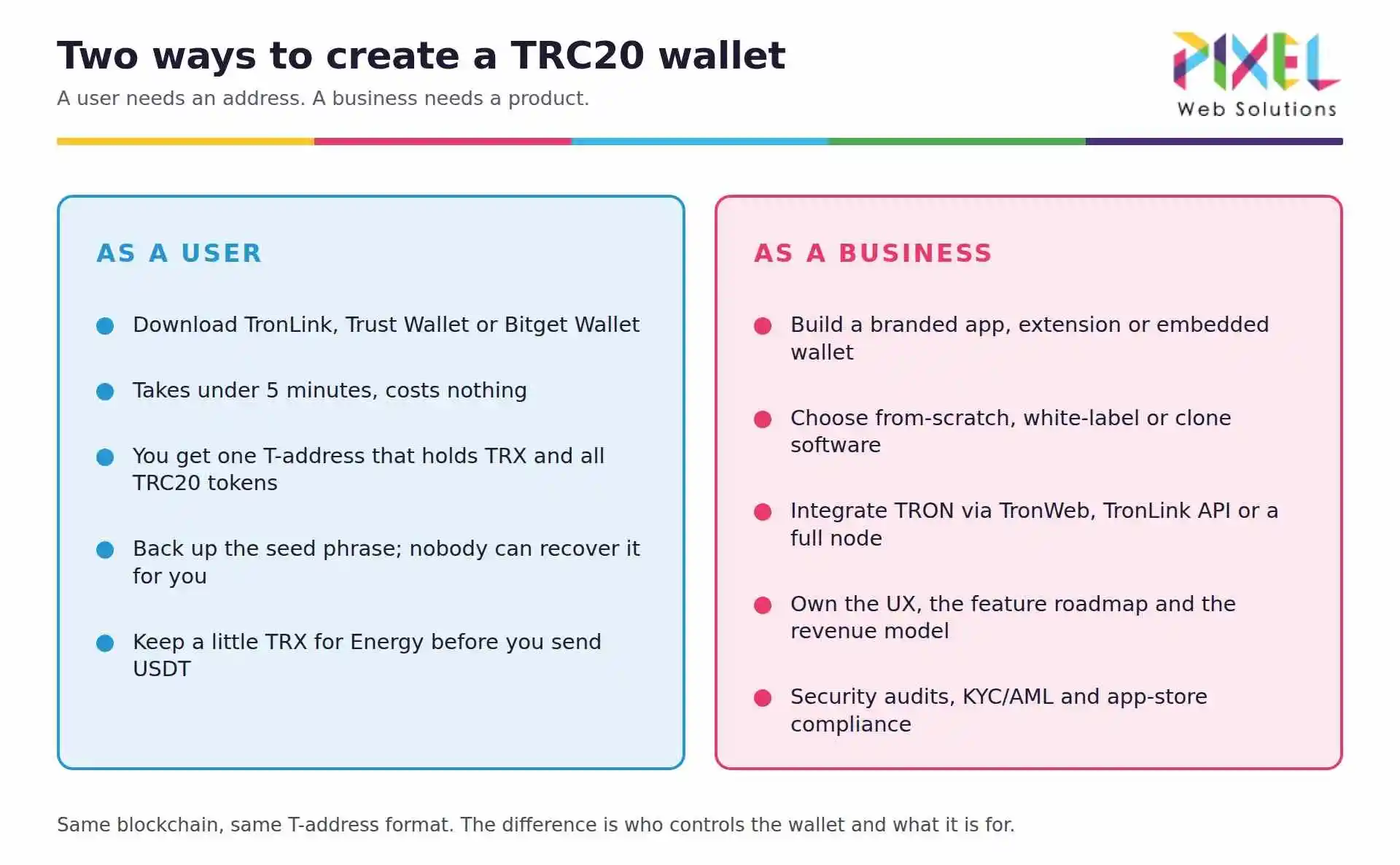
To create a crypto wallet as a user, download a wallet app from its official site, select Create New Wallet, write the seed phrase down offline, set a PIN or biometric lock, and send funds to the address it generates. It takes about five minutes and costs nothing. To create a crypto wallet app as a business, you choose the wallet type and chains, generate and secure keys, build the backend and interface, audit the security, and ship to the app stores, typically in 8 to 20 weeks for $25,000 to $150,000 or more.
This guide covers both. The first half is the user setup, including Bitcoin specifically. The second half is the full development process, features, tech stack and cost, from a team that builds wallets through its crypto wallet development services.
How to Create a Crypto Wallet in 5 Steps (User)
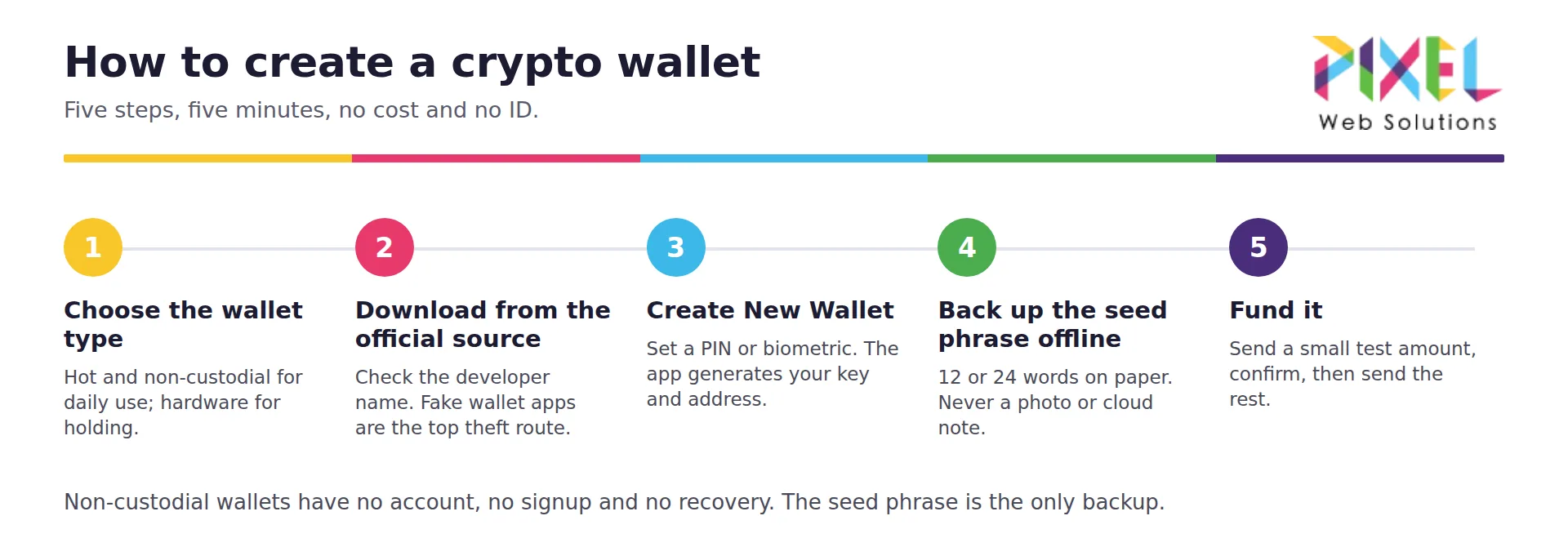
- Choose the wallet type. For daily use and DeFi, a non-custodial hot wallet such as MetaMask (Ethereum and EVM), Phantom (Solana) or Trust Wallet (multi-chain). For long-term holding, a hardware wallet such as Ledger or Trezor.
- Download from the official source only. Go to the wallet’s own website or the app store listing linked from it, and check the developer name. Fake wallet apps are the most common way funds are stolen at this stage.
- Select Create New Wallet and set a strong password, PIN or biometric lock. The app generates your private key and derives your address.
- Back up the seed phrase offline. Write the 12 or 24 words on paper and store them somewhere safe. Anyone with the phrase controls your funds, and no provider can recover it for you. Never photograph it or store it in cloud notes.
- Fund the wallet. Copy your receiving address, send a small test amount first, confirm it arrives, then send the rest. Keep a little of the chain’s native coin (ETH, SOL, TRX, BNB) for transaction fees.
That is the whole process. There is no account creation, no identity check and no fee for a non-custodial wallet.
How to Create a Bitcoin Wallet
Creating a Bitcoin wallet follows the same five steps with Bitcoin-specific choices. Use a Bitcoin-native wallet such as Sparrow, BlueWallet or Electrum, or a hardware wallet like Ledger or Trezor for holding.
- Your address starts with
bc1(native SegWit, cheapest fees), or3or1for older formats. All three work;bc1costs less to send from. - Bitcoin fees are paid in BTC and rise with network congestion. Check the current fee rate before sending.
- A Bitcoin wallet holds only Bitcoin. For Ethereum, Solana or TRC20 tokens you need a wallet for that chain; see how to create a TRC20 wallet and how to create a Solana wallet.
- Lightning wallets (BlueWallet, Phoenix) are separate and made for small, instant payments.
Types of Crypto Wallets
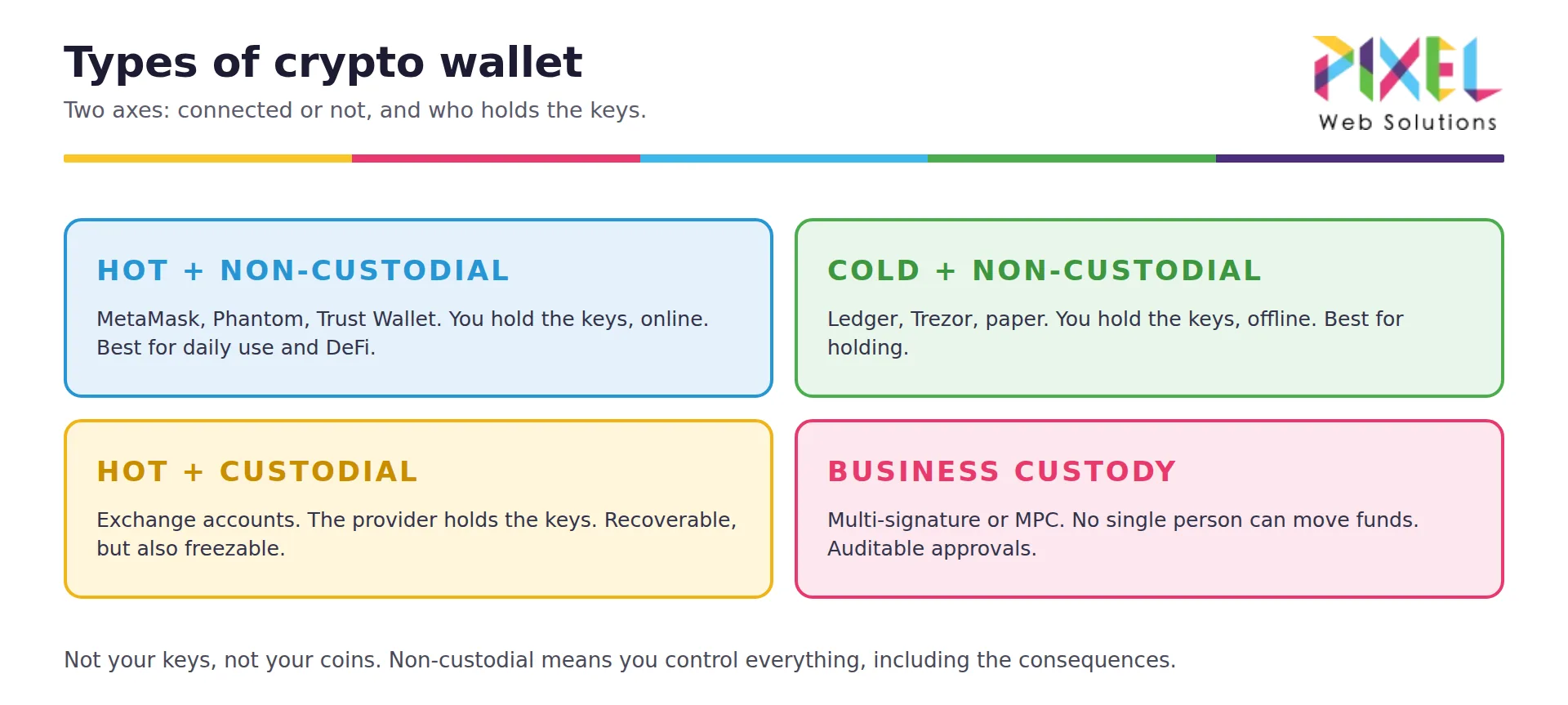
Wallets differ on two axes: whether they are connected to the internet, and who holds the keys.
| Hot wallet | Cold wallet | |
|---|---|---|
| Non-custodial | MetaMask, Phantom, Trust Wallet. You hold keys, online. | Ledger, Trezor, paper. You hold keys, offline. |
| Custodial | Exchange accounts. Provider holds keys, online. | Institutional custody. Provider holds keys, offline. |
- Hot: convenient for daily use and DeFi; higher exposure because the keys sit on a connected device.
- Cold: safest for holding; slower to transact and requires physical access.
- Custodial: the provider can recover your account, and can also freeze or lose it. Not your keys, not your coins.
- Non-custodial: you control everything, including the consequences of losing your seed phrase.
Most experienced users run both: a hot wallet with a working balance and a hardware wallet for the rest. The full breakdown is in types of crypto wallets, and picks are in best crypto wallets and best DeFi wallets.
Seed Phrase and Security Checklist
Your seed phrase is your wallet. Everything else is replaceable.
- Write it on paper or steel, never in a photo, email, cloud note or password manager you do not control.
- Store a second copy in a different physical location.
- Never type it into a website. No support agent from any wallet will ever ask for it.
- Verify the receiving address character by character; clipboard-hijacking malware swaps addresses.
- Send a small test transaction first, every time you use a new address.
- Review and revoke token approvals periodically if you use DeFi.
- Keep large balances on a hardware wallet and a working balance in a hot wallet.
Setting Up a Crypto Wallet for a Business
A business needs different controls from an individual. Use a multi-signature wallet (Safe) or an MPC wallet so no single person can move funds, define signing thresholds and spending limits, and keep an auditable record of every approval. For treasury holdings, pair that with hardware custody.
See multi-signature wallet development and MPC wallet development for how each model works.
How to Create a Crypto Wallet App (Business)
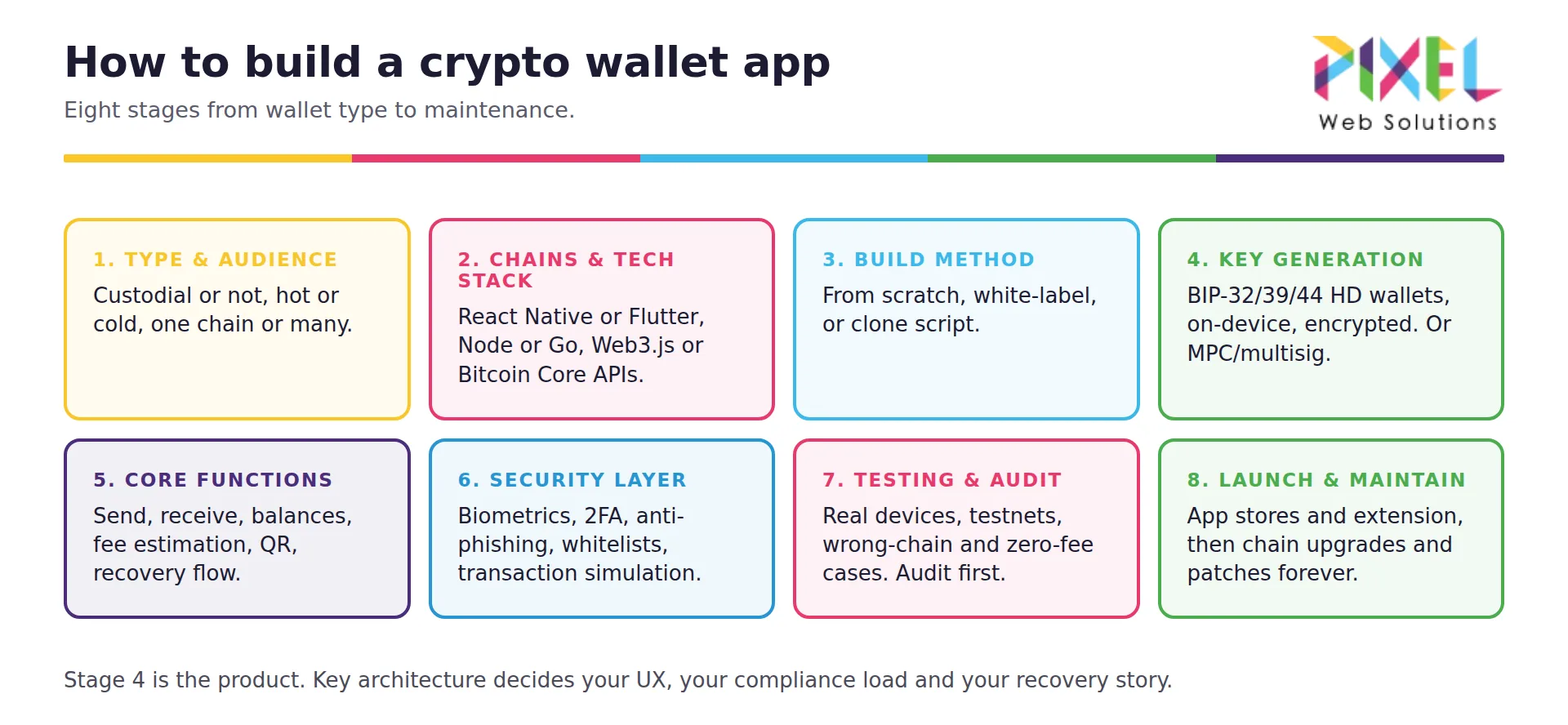
Building a wallet product is a different project from setting one up. These are the eight stages.
1. Define the wallet type and audience
Custodial or non-custodial, hot or cold, single-chain or multi-chain, consumer or business. This one decision drives your compliance load, your key architecture and your cost. Non-custodial avoids most licensing; custodial makes you responsible for other people’s money.
2. Choose chains and the tech stack
Decide which networks you support: Bitcoin, Ethereum and EVM chains, Solana, TRON, or a multi-chain set. Typical stack: React Native or Flutter for mobile, Swift or Kotlin for native, Node.js, Python or Go on the backend, and Web3.js, Ethers.js, Solana web3.js or Bitcoin Core APIs for chain access, over your own nodes or a managed node provider.
3. Choose the build method
From scratch for full control and IP, white-label crypto wallet development for the fastest launch, or a clone script such as the MetaMask clone or Trust Wallet clone to replicate a proven product. Reference builds are covered in how to build a crypto wallet like MetaMask and like Trust Wallet.
4. Key generation and storage
The core of the product. Generate keys on-device following BIP-32, BIP-39 and BIP-44 for hierarchical deterministic wallets, encrypt them at rest, and never transmit them to your servers in a non-custodial design. For business products, MPC or multi-signature replaces the single-key model.
5. Core wallet functions
Address generation, send and receive, balance and transaction history from chain indexers, fee estimation, QR scanning, and a recovery flow the user can actually complete under stress.
6. Security layer
Encrypted key storage, biometric and PIN login, two-factor authentication, anti-phishing checks, address whitelisting, transaction simulation where possible, and a smart contract audit for any on-chain components.
7. Testing and audit
Test on real devices across iOS and Android, on testnets first, covering wrong-chain sends, zero-fee-balance sends, recovery from seed, and failed-transaction states. Commission an independent security audit before launch, not after.
8. Launch and maintain
Ship to the App Store, Google Play and as a browser extension where relevant, then plan for ongoing chain upgrades, security patches and support. Wallets are maintained products, not one-off builds.
Features to Include in a Crypto Wallet App
- Multi-currency and multi-chain support
- Secure private key management and encrypted storage
- Biometric and PIN authentication, plus 2FA
- Send, receive and QR scanning
- Transaction history and push notifications
- Cross-platform: iOS, Android, web, extension
- Seed phrase backup and recovery
- dApp connectivity, staking and DeFi access
- In-app swaps and a fiat on-ramp
- Multi-language support and customer service
The full prioritised spec is in crypto wallet features. For NFT-focused products see NFT wallet development; for DeFi-native products, DeFi wallet development; for fiat-heavy products, digital wallet app development.
How Much Does It Cost to Create a Crypto Wallet App?
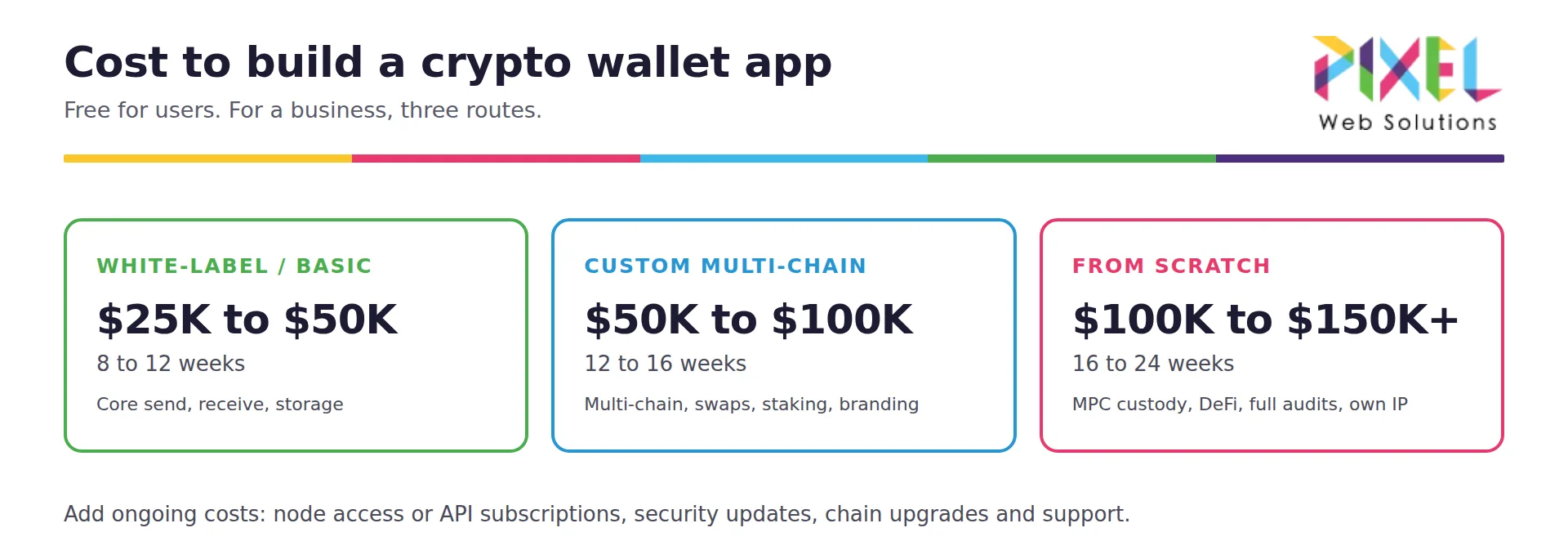
Creating a wallet as a user is free. Building a wallet app typically costs $25,000 to $50,000 for a white-label or basic build, $50,000 to $100,000 with custom features and multi-chain support, and $100,000 to $150,000 or more for a from-scratch product with MPC custody, DeFi integration and full audits. Budget 8 to 20 weeks depending on the route, plus ongoing costs for node access, maintenance and security updates.
Cost drivers: number of chains, custody model, platform count, security and compliance scope, and UI complexity. The itemised breakdown is in crypto wallet development cost.
Adding a Payment Gateway to Your Wallet
A wallet that can accept payments becomes a merchant product. Integrating a crypto payment gateway adds checkout, automatic conversion and settlement, turning a storage app into a transaction business. See crypto payment gateway development and payment gateway integration.
Frequently Asked Questions
How do I create a crypto wallet?
Download a wallet app from its official site, select Create New Wallet, back up the seed phrase offline, set a PIN or biometric, and fund the address it generates. It takes about five minutes and is free.
How do I create a Bitcoin wallet?
Use a Bitcoin wallet such as Sparrow, BlueWallet or Electrum, or a Ledger or Trezor for holding, and follow the same five steps. Your address will start with bc1, 3 or 1.
Is creating a crypto wallet free?
Yes for software wallets. Hardware wallets cost money to buy, and sending transactions costs network fees in the chain’s native coin.
Do I need ID to create a crypto wallet?
No, for a non-custodial wallet. Custodial wallets and exchange accounts require KYC verification.
What happens if I lose my seed phrase?
The funds are unrecoverable. No wallet provider, exchange or support agent can restore them. This is the trade-off for holding your own keys.
How long does it take to build a crypto wallet app?
8 to 12 weeks for a white-label build, 12 to 16 weeks with customisation, 16 to 24 weeks from scratch.
How much does it cost to develop a crypto wallet?
$25,000 to $150,000 or more depending on chains, custody model, platforms and compliance scope.
Should I build from scratch or use white-label?
White-label if your edge is distribution or an existing user base; custom if your edge is a feature, custody model or market that existing wallets do not serve.