







In the native vs hybrid mobile apps decision, native apps (Swift for iOS, Kotlin for Android) give the best performance and full device access but need two codebases, while hybrid and cross-platform apps share one codebase across iOS and Android, so they launch faster and cost less. In 2026 the real choice has three options: native, cross-platform frameworks that render native-quality UI (Flutter, React Native, Kotlin Multiplatform), and web-based hybrid apps (Ionic with Capacitor) for content and form-driven apps.
In today's fast-paced digital era, businesses must adopt modern technology to stay competitive, and mobile apps sit at the centre of that shift. Users have moved from web pages to apps for chatting, shopping, entertainment and services. Before a startup or enterprise builds one, though, it must make a crucial decision: which development approach should the app use, native or hybrid?
Each approach serves a different purpose. This guide explains what native and hybrid apps are, their features, advantages and disadvantages, real-world examples, current framework usage data, a cost comparison with the maths shown and a decision table to help you choose.
Key Takeaways
- Native means one codebase per platform: Swift and SwiftUI for iOS, Kotlin and Jetpack Compose for Android, with full access to device features and the best performance.
- "Hybrid" now covers two very different things: web-based hybrid apps that run HTML, CSS and JavaScript in a WebView (Ionic, Capacitor), and cross-platform frameworks that render native-quality interfaces (Flutter, React Native, Kotlin Multiplatform).
- Cross-platform has matured: React Native 0.82 made its New Architecture the only architecture in October 2025, and Compose Multiplatform for iOS became stable in May 2025.
- Developers use both: in Stack Overflow's survey, 9.4% of respondents used Flutter and 8.4% React Native (2024), while 10.8% used Kotlin and 5.4% Swift (2025).
- Choose by product, not by fashion: go native for heavy graphics, AR, deep hardware access or platform-first polish; go cross-platform for most business, commerce and MVP apps; go web-based hybrid or a PWA for content and internal tools.
What Is a Native App?
A native app is a platform-specific mobile application: you build one version for iOS and a separate one for Android. Each uses the platform's own languages and tools. Android apps are built with Kotlin (and older Java code) in Android Studio, increasingly with the Jetpack Compose UI toolkit. iOS apps are built with Swift in Xcode, increasingly with SwiftUI, while Objective-C survives mainly in older codebases. Native apps run directly on the device and can use every hardware feature and system API, which makes them powerful and robust.
Explore their features to decide whether native apps are the right foundation for your next product.
Notable Features of Native Apps
Native apps carry attributes that affect security, branding and performance. Here are the traits that set them apart in the app market.
- Full platform support from day one: Apple and Google ship new APIs, widgets and design patterns to native toolkits first. Native apps can adopt them immediately instead of waiting for a framework update.
- Standardised development tools: each platform provides its own complete kit, Xcode with SwiftUI for iOS and Android Studio with Jetpack Compose for Android, with debuggers, profilers and simulators built in.
- Greater performance: native code runs without an extra rendering or bridge layer, so animations, scrolling and heavy processing stay smooth.
- Platform-specific languages: Kotlin (and Java) for Android, Swift (and Objective-C) for iOS. Each requires developers who know that platform well.
These features make native apps competitive in a demanding market. Pixel Web Solutions builds native apps through dedicated Android app development and iOS app development teams, helping entrepreneurs launch and grow their mobile products.
Perks and Pitfalls of Native Apps
Native apps benefit a business in several ways, from responsiveness to reliability. Let's look at what makes them the best-performing option, and what they cost you.
Benefits
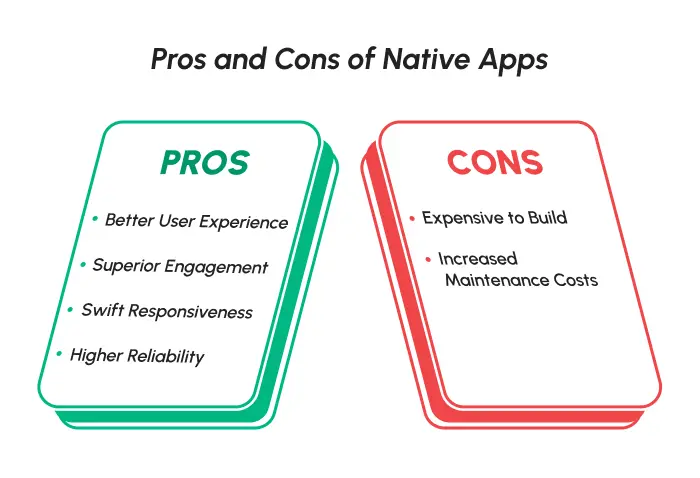
- Better user experience: native apps follow each platform's design guidelines, so they feel familiar to users and behave the way people expect.
- Rich interface and device access: they use the camera, GPS, biometrics, Bluetooth, sensors and background tasks directly, without plugins.
- Superior engagement: apps that feel at home on the platform tend to earn better reviews, loyalty and retention.
- Swift responsiveness: native apps process data on the device with no extra layer, giving instant, smooth interactions.
- Higher reliability: fewer layers between your code and the operating system means fewer compatibility surprises after OS updates.
Challenges
Like every coin, native apps have two sides. Understanding the downsides helps you plan a smooth launch.
- Cost to create: you build and test two apps, one for each operating system. That roughly doubles the client-side work and extends development time.
- Updates and maintenance: each new iOS or Android version needs testing and fixes in two codebases, which raises maintenance costs.
- Hiring: you need specialist iOS and Android developers, or a partner that has both.
Beyond theory, many businesses have made their vision happen with native apps. Let's look at real examples.
Real-World Examples of Native Apps
Proof builds trust. Here are well-known apps whose core experiences are built mainly with native code:
- Uber: ride hailing
- Spotify: music and entertainment
- WhatsApp: messaging
- Instagram: social media
In practice, big apps mix approaches. Meta's own React Native showcase lists the Facebook app and Instagram for Meta Quest, which shows that even "native" giants use shared cross-platform code where it saves time. Now let's look at the other methodology: hybrid apps.
Understanding Hybrid Apps
A hybrid app combines elements of native and web applications. Unlike native apps, hybrid apps use a single codebase that works on both Android and iOS. Classic hybrid apps are web code (HTML, CSS and JavaScript) running inside a native container called a WebView, built with tools such as Ionic and Capacitor. Plugins connect that web code to device features.
Today, many people also use "hybrid" for cross-platform frameworks. These share one codebase too, but they do not run your interface as a web page:
- Flutter (Google) draws its own UI with the Impeller rendering engine, which is the default renderer on iOS and on modern Android devices.
- React Native (Meta) turns JavaScript or TypeScript components into real native views. Since React Native 0.82 in October 2025, the faster New Architecture is the only architecture.
- Kotlin Multiplatform (JetBrains) shares business logic in Kotlin while keeping native UI, or shares UI too with Compose Multiplatform, whose iOS support became stable in May 2025. Kotlin Multiplatform itself has been stable since November 2023.
Hybrid and cross-platform apps have become popular for their multi-platform reach. Let's look at the features that make them stand out.
Competitive Features of Hybrid Apps
What makes hybrid apps distinct in the market? Here is the edge they offer businesses.
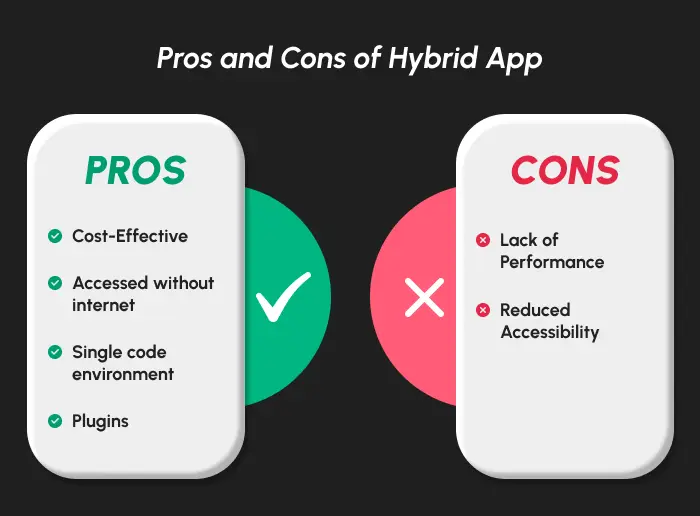
- Cost-effective: one shared codebase and one team lower development, infrastructure and maintenance costs.
- Offline support: like native apps, hybrid apps can cache data and assets on the device, so key screens work without a connection if the app is designed for it.
- Portable code: one codebase serves both Android and iOS, and often the web as well. Shopify reported about 95% to 99% shared code across iOS and Android in its first React Native apps.
- Plugins and native modules: hybrid apps reach device hardware through plugins, and cross-platform frameworks let developers write native modules for anything a plugin does not cover.
These are the core strengths of hybrid apps. Let's see how they translate into benefits and limits.
Major Upsides and Limitations of Hybrid Apps
Hybrid apps help businesses in many ways. Let's start with the positives.
Pros
- Faster market entry: one codebase shortens the development cycle, so both store versions launch together.
- Wider user base from day one: launching on Android and iOS at once reaches both audiences without building twice.
- Easier maintenance: fixes and new features ship once for both platforms.
- Convenient for scaling: the same code can extend to tablets, the web or desktop, and new features do not need to be built twice.
Cons
- Performance gaps for heavy workloads: web-based hybrid apps can feel slower in complex animations, large lists or graphics. Modern cross-platform frameworks close most of this gap, but 3D, AR and real-time media still favour native.
- Lag on new device features: a brand-new iOS or Android API reaches a plugin or framework after it reaches native toolkits.
- App store risk for thin wrappers: Apple's App Store Review Guideline 4.2 rejects apps that are little more than a repackaged website, so a hybrid app must offer real app features.
Weighing both sides helps you decide how hybrid apps fit your business plan.
Examples of Successful Hybrid and Cross-Platform Apps
Many successful apps share one codebase across platforms. Here are verified examples from the frameworks' own showcases and company engineering posts:
- Shopify: decided in 2020 that all new mobile apps would use React Native, including Shop and Shopify Point of Sale.
- Microsoft Office, Outlook and Teams: listed in the React Native showcase for iOS and Android.
- Google Pay, Nubank and BMW: featured in the Flutter showcase.
There is also a famous warning. In 2012, Mark Zuckerberg said Facebook's biggest mistake on mobile was betting too much on HTML5, and the company rebuilt its app natively. Meta later created React Native to get native performance with shared code, which is why the old web-based hybrid model and today's cross-platform frameworks should not be judged as one thing.
Framework Usage in 2026: What Developers Actually Use
Usage data shows that native and cross-platform skills are both in wide use, so you will find developers for either path.
| Technology | Approach | Share of all respondents | Survey |
|---|---|---|---|
| Kotlin | Native Android (and Kotlin Multiplatform) | 10.8% | Stack Overflow Developer Survey 2025 |
| Swift | Native iOS | 5.4% | Stack Overflow Developer Survey 2025 |
| Flutter | Cross-platform | 9.4% | Stack Overflow Developer Survey 2024 |
| React Native | Cross-platform | 8.4% | Stack Overflow Developer Survey 2024 |
Stack Overflow dropped its "other frameworks and libraries" question in 2025, so 2024 is the latest year with Flutter and React Native figures. Among the 2024 respondents, Flutter and React Native were the two most used mobile frameworks, roughly level with each other.
Native vs Hybrid Mobile Apps: A Detailed Breakdown
Let's put native, cross-platform and web-based hybrid apps head to head. Here are the key differences.
| Aspect | Native apps | Cross-platform (Flutter, React Native, KMP) | Web-based hybrid (Ionic, Capacitor) |
|---|---|---|---|
| Code portability | Separate code for each platform | One codebase, small platform-specific parts | One web codebase for app and web |
| Performance | Highest | Close to native for most business apps | Good for content and forms; weaker for heavy graphics |
| Device feature access | Full and immediate | Broad, through plugins or native modules | Through plugins; newest APIs arrive later |
| User experience | Platform-perfect | Native-quality, consistent across platforms | Web-like unless carefully tuned |
| Time to market | Longest | Shorter | Shortest if you already have a web app |
| Development cost | Highest (two apps) | Lower (one shared app) | Lowest |
| Security | Strong, depends on implementation | Strong, depends on implementation | Strong if WebView bridges and plugins are locked down |
| Store distribution | App Store and Google Play | App Store and Google Play | App Store and Google Play, but thin wrappers risk rejection |
| Future-proofing | Highly scalable | Highly scalable | Moderately scalable |
A correction to a common myth: hybrid apps are installed from the app stores just like native apps, and they are not "accessible from any web browser". Security depends on how the app is built, for example on locking down the bridge between web code and native code, not on the approach alone.
Cost Comparison: Native vs Cross-Platform, With the Maths
Every quote is hours multiplied by an hourly rate. Here is an illustrative moderate app, a booking and payments app with accounts, a catalogue, push notifications and an admin panel, estimated both ways. These are industry estimates, not Pixel quotes.
| Work item | Native (two apps) | Cross-platform (one app) |
|---|---|---|
| iOS client | 700 hours | Shared |
| Android client | 700 hours | Shared |
| Shared client code | n/a | 800 hours |
| Platform-specific fixes and native modules | n/a | 150 hours |
| Backend and admin panel (same for both) | 400 hours | 400 hours |
| Total | 1,800 hours | 1,350 hours |
| At $25/hour | $45,000 | $33,750 |
| At $50/hour | $90,000 | $67,500 |
| At $100/hour | $180,000 | $135,000 |
In this example, cross-platform saves 450 hours, or 25% of the total. The saving is smaller than "half" because the backend, design and testing are needed either way. Maintenance follows the same logic: one client codebase means one set of OS upgrades to test. For a full line-by-line estimate, see this guide to mobile app development cost.
Native vs Hybrid Mobile Apps: Which Is Best for Your Business Needs?
Both approaches have unique strengths, and the right fit depends on your requirements and business model. Use this decision table to choose.
| If your app needs… | Choose | Why |
|---|---|---|
| 3D games, AR, heavy video or audio processing | Native | Maximum performance and direct GPU and sensor access |
| Deep hardware use (Bluetooth devices, health sensors, background tasks) | Native, or Kotlin Multiplatform with native UI | Immediate access to platform APIs |
| A platform-first premium feel on day one of each OS release | Native | New Apple and Google APIs arrive in native toolkits first |
| E-commerce, booking, fintech or social features on both stores | Cross-platform (Flutter or React Native) | Near-native UX at lower cost |
| An MVP to test demand on iOS and Android | Cross-platform | One team, one codebase, faster learning |
| An existing native Android team that wants to add iOS | Kotlin Multiplatform | Reuse Kotlin logic, keep native UI |
| A content app, internal tool or app built on an existing web app | Web-based hybrid (Ionic, Capacitor) or a PWA | Reuse web code and skills |
If your application demands top performance and full device access, go for native development. If budget and speed to market matter most, a cross-platform framework is the practical middle ground: React Native app development suits teams with JavaScript or TypeScript skills, and Flutter app development suits apps that need a highly custom, consistent design. Testing an idea first? Read how to scope a lean first release with an MVP development company, or compare specialist hybrid app development companies.
Looking for expert guidance? Pixel Web Solutions, a prominent mobile application development company, builds native, cross-platform and hybrid apps to industry standards. Be it a scalable Android platform, a polished iOS application or one app for both, its team delivers with clear hour-based estimates. Still unsure where to start? Talk to Pixel Web Solutions about your app.
Frequently Asked Questions
What is the main difference between native and hybrid apps?
Native apps are built separately for each platform in its own language, such as Swift for iOS and Kotlin for Android. Hybrid apps use one shared codebase for both platforms, either as web code in a WebView or through a cross-platform framework.
Is Flutter native or hybrid?
Flutter is a cross-platform framework. It compiles to native machine code and draws its own interface, so it is not a web-based hybrid app, but it is not platform-native code either.
Is React Native a hybrid app framework?
React Native is cross-platform rather than web-based hybrid. It uses JavaScript or TypeScript but renders real native views, and since version 0.82 it runs only on its faster New Architecture.
Are hybrid apps cheaper than native apps?
Usually, yes. In the worked example above, a cross-platform build needs 1,350 hours against 1,800 for two native apps, a 25% saving, because the backend and design work are needed either way.
Which is better for performance, native or hybrid?
Native apps perform best, especially for games, AR and heavy media. Modern cross-platform frameworks come close for most business apps, while web-based hybrid apps work best for content and forms.
Will Apple reject a hybrid app?
Not for being hybrid. Apple rejects apps that are little more than a repackaged website under Guideline 4.2, so a hybrid app must offer real app features and a quality experience.
Conclusion
The native vs hybrid mobile apps choice is no longer a simple two-way contest. Native still leads for performance and device access, cross-platform frameworks such as Flutter, React Native and Kotlin Multiplatform now deliver near-native apps from one codebase, and web-based hybrid apps remain a smart route for content and internal tools. Match the approach to your product's needs, budget and timeline, and you will pick the right foundation for your next mobile app.